
Many of you may have heard the terms "database" and "spreadsheet" but don't really know what they are or how they might be useful to you. Both are software applications (computer programs) that store and retrieve data. They are similar in their functions but they do have some distinct differences.
A database is primarily for storing and retrieving "records". A record is simply a collection of related data. For example; A business may keep information about their customers and their sales in a database so that they can easily store and retrieve that information as they need it. For customers, the business would likely store such information as name, address and phone number. This information, as it relates to one particular customer, would be one "record". Each part of the record, such as the phone number, is called a "field". A record can be made up of any number of fields depending on how much information you need to store. If the business had thousands of customers, then there would be thousands of records in the database, one record for each customer.
There several advantages to storing this information in a database.
1. Speed.
The information can be retrieved quickly and easily. A database can search
thousands of records in one second.
2. Consistency.
Forms can be used to insure that information is stored in a logical and uniform
manner. Imagine the nightmare a business would have searching for information
about one customer among thousands of customers if some employees entered
customer names by "last name, first name" and other employees entered customer
information using "first name, last name". By using "data entry forms", a
database insures that information is stored in a uniform manner and can even
check to see if all necessary information has been entered.
3. Accuracy and
information shared among applications.
All related applications such as customer lists, invoices, sales records,
mailing lists, and phone lists will draw the information from ONE place, the
database. That way, say if a customer's phone number changes, the information
only needs to be updated one time, in one place, and all of the related
applications will retrieve that updated and correct information.
If you did not use a database and kept all of those lists and records
separately, you would have to change the phone number in each location.
Otherwise, you might find a different phone number on your customer phone list
than is on your sales records for that customer. How would you know which one is
correct?
4. Efficiency.
Most databases are "relational" databases that use a "one-to-many" structure.
This means that, for example, a repeat customer may have many sales records
related to that one customer. The information about a specific customer
only has to be entered into the database once. Each time that customer makes a
purchase, a new sales record is created listing the information about that
particular sale (items purchased, price paid, date of sale, etc.) and each sales
record is then linked to the customer record already stored in the
database.
This not only improves efficiency and accuracy by not having to collect all the information about the customer for each sale but it also allows to analyze your stored information. You can easily look up all sales records related to a specific customer and see everything that customer has purchased.
Examples of how a database might be used in a business application:
You could easily look up all customers that haven't made a purchase recently and send them a note telling them about items that you currently have on sale or specials that you are currently offering.
You could quickly and easily look up what products or services are selling well and which ones are not.
You can use "filters" to show only records that meet certain criteria that you specify. For example; You could generate a list of your customers that live in a specific zip code for a targeted marketing campaign or you could generate a list of customers who have purchased a specific product and send them a notice that new similar products are now being offered.
You could have the database compare your sales against your inventory to see when you need to restock products.
You could easily check to see what regions generate the most sales or what items are the best sellers.
The database could be programmed to automatically generate a competed invoice, packing slip and shipping label each time a sale is entered.
Pre-defined forms and reports can be created for common tasks to provide speed and efficiency.
A spreadsheet is similar to database in some ways. It stores information in an organized manner and allows that information to be sorted and filtered. The real strength of a spreadsheet is it's ability to do complex calculations. While a database can also do calculations, a spreadsheet does them more easily and can do some complex calculations that would be very difficult to do with a database.
Information is stored in a spreadsheet in a grid of "cells" which are laid out in rows and columns. Multiple spreadsheets can be linked together so that when information is updated in one spreadsheet, it is also updated in linked spreadsheets.
The value shown in a given cell may be based on a calculation of the values of other cells. In this way, when the value of a cell is changed or updated, the cells with the calculated values in other cells are automatically updated. These functions can be valuable for doing "What if" analysis where you can change the value of certain cells to see what impact those changes would have on the overall picture.
Here are some examples of simple spreadsheets to illustrate how they might be used in a business:
| Gross Sales | $ 20,000.00 |
| Cost of goods | $(10,000.00) |
| Advertising | $ (1,000.00) |
| Shipping | $ (2,500.00) |
| Overhead Expenses | $ (3,000.00) |
| Net Profit | $ 3,500.00 |
In the example above, the value in the "Net Profit" cell is automatically calculated by summing the cells in the column above it. If the value of one of the upper cells were to change, the "Net profit cell would automatically update to show the correct value.
In the example below, sales are calculated by region and then a bar chart is generated to illustrate the information. You can tell at a glance that the South Region had the strongest sales and the East Region may need a little help. The values in the "regional sales" cells may actually be the calculated sums from cells in another spreadsheet.
| Sales by Region | ||
| Region | Sales | % of Total Sales |
| North | $25,000.00 | 29% |
| South | $35,000.00 | 41% |
| East | $10,000.00 | 12% |
| West | $15,000.00 | 18% |
| Total Sales | $85,000.00 | |
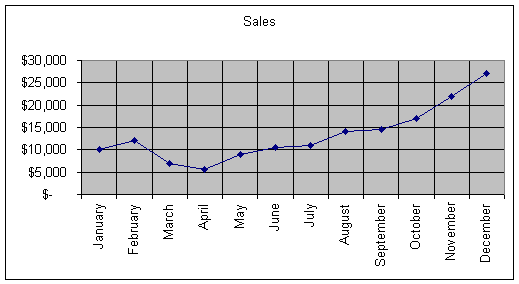
Below is an example of a simple spreadsheet showing sales by month over the period of one year. A line chart is then generated to illustrate sales performance. You can tell at a glance that sales have steadily increased since April with December being the strongest month for sales.
| Sales by Month | |
| Month | Sales |
| January | $ 10,000 |
| February | $ 12,000 |
| March | $ 7,000 |
| April | $ 5,500 |
| May | $ 9,000 |
| June | $ 10,500 |
| July | $ 11,000 |
| August | $ 14,000 |
| September | $ 14,500 |
| October | $ 17,000 |
| November | $ 22,000 |
| December | $ 27,000 |
| Total Sales | $ 159,500 |
Databases and spreadsheets can be linked so that they can share information with each other. For example; a spreadsheet could import sales record information from a database and then calculate the total sales for a given period of time or generate a chart illustrating sales performance over a range of time.
The applications and abilities of databases and spreadsheets is limited only to your imagination. They are not only for business applications. I happen to be a knife collector and I have over 300 knives in my collection. I created a database that includes details about each knife, when I purchased it, who I purchased it from, how much I paid for it, and how much it's current value is. I can search the database for information about a specific knife. If I want, I can show only the knives made by a specified manufacturer. I have created reports that show the total amount of money that I have invested in the collection and what the current value of collection is.
Databases and/or spreadsheets can be used to store and analyze virtually any kind of information. For example, if you were an officer of a club or organization you could utilize a database to keep track of membership and if dues have been paid. If you own rental property you could utilize a spreadsheet to keep track of income and expenses.
Both databases and spreadsheets can be very complicated to set up initially and often require a great deal of experience and knowledge to create them. However, once the database or spreadsheet has properly been set up, data can easily be entered and updated by even inexperienced users using data entry forms that prompt the user for the information needed and automatically checks to make sure that the information is complete and formatted correctly. Forms and reports can easily be viewed or printed at the click of a button.